Best Alternatives to Adobe Photoshop in 2026 – Top Photo Editing Apps Compared

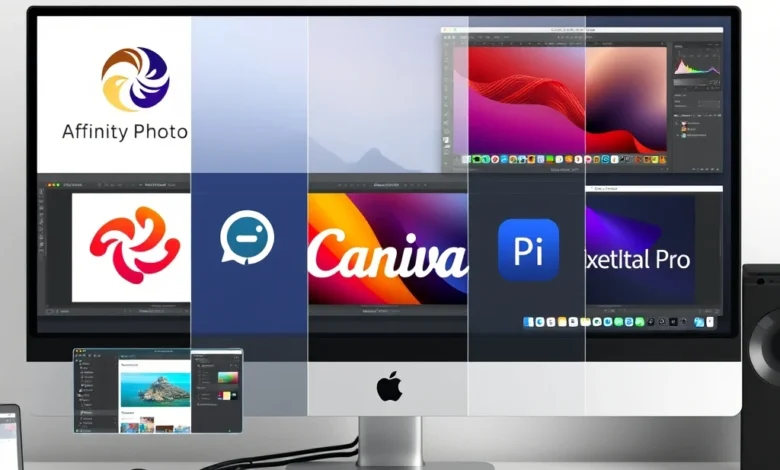
In the ever-evolving world of digital creativity, finding the right photo editing software is crucial for both professionals and enthusiasts. Adobe Photoshop has long been the industry standard, but it’s not the only option. Whether you’re looking for a more affordable alternative, a simpler interface, or specific features, there are plenty of excellent alternatives to Adobe Photoshop in 2026. This article will explore the best alternatives, their unique features, and who they are best suited for.
Photo editing apps have come a long way, offering powerful tools that rival even the most advanced software. From AI-powered enhancements to user-friendly interfaces, these alternatives cater to a wide range of needs and skill levels. Whether you’re a professional photographer, a social media influencer, or a hobbyist, there’s an app that can help you achieve your creative goals.
🎨 Overview of Photo Editing Apps in 2026
The photo editing landscape in 2026 is diverse and dynamic. With advancements in AI and machine learning, many apps now offer features that were once only available in high-end software. From basic touch-ups to complex manipulations, these apps provide a range of tools to suit different needs. Whether you’re on a budget or looking for a specific feature, there’s an app that can meet your requirements.
In this article, we’ll compare some of the top alternatives to Adobe Photoshop, highlighting their strengths and weaknesses. We’ll also provide recommendations based on different user needs, from beginners to professionals. By the end, you’ll have a clear understanding of which app is best for you.
- ✅ Diverse range of features
- 🎯 AI-powered enhancements
- ⚠️ Varying price points
📱 Top Alternatives to Adobe Photoshop
🔥 Affinity Photo
Affinity Photo is a powerful alternative to Adobe Photoshop, offering a one-time purchase model that makes it an attractive option for those looking to avoid subscription fees. It boasts a wide range of professional-grade tools, including advanced layer management, vector tools, and a comprehensive set of filters and effects. Affinity Photo is particularly popular among photographers and graphic designers who need a robust yet affordable solution.
The interface is intuitive and customizable, making it easy to navigate even for beginners. It also supports a wide range of file formats, including PSD files, ensuring seamless integration with other software. With regular updates and a strong community, Affinity Photo is a solid choice for anyone looking to move away from Adobe’s ecosystem.
🎨 Corel PaintShop Pro
Corel PaintShop Pro is another excellent alternative to Adobe Photoshop, offering a comprehensive set of tools for photo editing and graphic design. It is known for its user-friendly interface and powerful features, making it a popular choice among both beginners and professionals. PaintShop Pro includes advanced tools for layer management, color correction, and special effects, as well as AI-powered enhancements for quick and easy edits.
One of the standout features of PaintShop Pro is its extensive library of tutorials and resources, which make it easy to learn and master the software. It also offers a one-time purchase option, making it a cost-effective choice for those looking to avoid ongoing subscription fees. With regular updates and a strong focus on user feedback, PaintShop Pro continues to be a top contender in the photo editing market.
🖌️ GIMP (GNU Image Manipulation Program)
GIMP is a free and open-source alternative to Adobe Photoshop, offering a wide range of powerful tools for photo editing and graphic design. It is particularly popular among budget-conscious users and those who prefer open-source software. GIMP includes advanced features such as layer management, color correction, and a comprehensive set of filters and effects, making it a versatile choice for a variety of projects.
The interface may take some getting used to, as it is not as polished as some commercial alternatives. However, its extensive customization options and active community make it a valuable tool for those willing to invest the time to learn it. With regular updates and a strong focus on user feedback, GIMP continues to be a top choice for free photo editing software.
📷 Canva
Canva is a popular online photo editing tool known for its user-friendly interface and extensive library of templates and design elements. While it may not offer the same level of advanced features as Adobe Photoshop, it is an excellent choice for beginners and those looking for a quick and easy way to create stunning visuals. Canva includes a wide range of tools for photo editing, graphic design, and social media content creation, making it a versatile option for a variety of projects.
One of the standout features of Canva is its collaborative tools, which allow multiple users to work on the same project simultaneously. It also offers a free plan with a range of basic features, as well as premium plans with access to additional tools and resources. With regular updates and a strong focus on user feedback, Canva continues to be a top choice for online photo editing.

🎨 Pixelmator Pro
Pixelmator Pro is a powerful alternative to Adobe Photoshop, offering a range of advanced tools for photo editing and graphic design. It is known for its intuitive interface and powerful features, making it a popular choice among both beginners and professionals. Pixelmator Pro includes advanced tools for layer management, color correction, and special effects, as well as AI-powered enhancements for quick and easy edits.
The software is designed specifically for macOS, ensuring seamless integration with other Apple devices and services. It also offers a one-time purchase model, making it a cost-effective choice for those looking to avoid ongoing subscription fees. With regular updates and a strong focus on user feedback, Pixelmator Pro continues to be a top contender in the photo editing market.
🎨 User Experience and Design
The user experience and design of a photo editing app can significantly impact your workflow and overall satisfaction. A well-designed interface with intuitive controls and easy navigation can make the editing process more enjoyable and efficient. In this section, we’ll compare the user experience and design of the top alternatives to Adobe Photoshop, highlighting their strengths and weaknesses.
Adobe Photoshop is known for its powerful tools and advanced features, but its interface can be overwhelming for beginners. In contrast, many of the alternatives we’ve reviewed offer more user-friendly interfaces with intuitive controls and easy navigation. Whether you’re a beginner or a professional, choosing an app with a well-designed interface can make a significant difference in your editing experience.
🔥 Affinity Photo
Affinity Photo offers a clean and intuitive interface with customizable workspaces, making it easy to navigate and find the tools you need. The software includes a range of advanced features, such as layer management, color correction, and special effects, all of which are easily accessible through the interface. Affinity Photo also offers a range of tutorials and resources to help users get started and master the software.
The interface is designed to be responsive and efficient, with tools and controls that are easy to access and use. The software also supports a wide range of file formats, including PSD files, ensuring seamless integration with other software. With regular updates and a strong focus on user feedback, Affinity Photo continues to be a top choice for photo editing.
🎨 Corel PaintShop Pro
Corel PaintShop Pro offers a user-friendly interface with intuitive controls and easy navigation. The software includes a range of advanced features, such as layer management, color correction, and special effects, all of which are easily accessible through the interface. PaintShop Pro also offers a range of tutorials and resources to help users get started and master the software.
The interface is designed to be responsive and efficient, with tools and controls that are easy to access and use. The software also supports a wide range of file formats, including PSD files, ensuring seamless integration with other software. With regular updates and a strong focus on user feedback, PaintShop Pro continues to be a top choice for photo editing.
🖌️ GIMP (GNU Image Manipulation Program)
GIMP offers a customizable interface with a range of tools and controls that can be tailored to your specific needs. The software includes advanced features such as layer management, color correction, and a comprehensive set of filters and effects. While the interface may take some getting used to, its extensive customization options and active community make it a valuable tool for those willing to invest the time to learn it.
The interface is designed to be responsive and efficient, with tools and controls that are easy to access and use. The software also supports a wide range of file formats, including PSD files, ensuring seamless integration with other software. With regular updates and a strong focus on user feedback, GIMP continues to be a top choice for free photo editing software.
📷 Canva
Canva offers a user-friendly interface with intuitive controls and easy navigation. The software includes a range of tools for photo editing, graphic design, and social media content creation, all of which are easily accessible through the interface. Canva also offers a range of tutorials and resources to help users get started and master the software.
The interface is designed to be responsive and efficient, with tools and controls that are easy to access and use. The software also supports a wide range of file formats, including PSD files, ensuring seamless integration with other software. With regular updates and a strong focus on user feedback, Canva continues to be a top choice for online photo editing.
🎨 Pixelmator Pro
Pixelmator Pro offers a clean and intuitive interface with customizable workspaces, making it easy to navigate and find the tools you need. The software includes a range of advanced features, such as layer management, color correction, and special effects, all of which are easily accessible through the interface. Pixelmator Pro also offers a range of tutorials and resources to help users get started and master the software.
The interface is designed to be responsive and efficient, with tools and controls that are easy to access and use. The software also supports a wide range of file formats, including PSD files, ensuring seamless integration with other software. With regular updates and a strong focus on user feedback, Pixelmator Pro continues to be a top choice for photo editing.
🚀 Performance and Stability
Performance and stability are crucial factors to consider when choosing a photo editing app. A software that is slow, crashes frequently, or consumes excessive resources can significantly impact your workflow and overall satisfaction. In this section, we’ll compare the performance and stability of the top alternatives to Adobe Photoshop, highlighting their strengths and weaknesses.
Adobe Photoshop is known for its powerful tools and advanced features, but it can be resource-intensive and may not perform well on older or less powerful devices. In contrast, many of the alternatives we’ve reviewed offer better performance and stability, making them a more reliable choice for a wide range of devices and systems.
🔥 Affinity Photo
Affinity Photo is known for its excellent performance and stability, even on less powerful devices. The software is optimized to run smoothly and efficiently, with tools and controls that are responsive and easy to use. Affinity Photo also offers a range of performance-enhancing features, such as non-destructive editing and GPU acceleration, making it a reliable choice for a wide range of projects.
The software is designed to be lightweight and efficient, with minimal impact on system resources. It also supports a wide range of file formats, including PSD files, ensuring seamless integration with other software. With regular updates and a strong focus on user feedback, Affinity Photo continues to be a top choice for photo editing.
🎨 Corel PaintShop Pro
Corel PaintShop Pro is known for its excellent performance and stability, even on less powerful devices. The software is optimized to run smoothly and efficiently, with tools and controls that are responsive and easy to use. PaintShop Pro also offers a range of performance-enhancing features, such as non-destructive editing and GPU acceleration, making it a reliable choice for a wide range of projects.
The software is designed to be lightweight and efficient, with minimal impact on system resources. It also supports a wide range of file formats, including PSD files, ensuring seamless integration with other software. With regular updates and a strong focus on user feedback, PaintShop Pro continues to be a top choice for photo editing.
🖌️ GIMP (GNU Image Manipulation Program)
GIMP is known for its excellent performance and stability, even on less powerful devices. The software is optimized to run smoothly and efficiently, with tools and controls that are responsive and easy to use. GIMP also offers a range of performance-enhancing features, such as non-destructive editing and GPU acceleration, making it a reliable choice for a wide range of projects.
The software is designed to be lightweight and efficient, with minimal impact on system resources. It also supports a wide range of file formats, including PSD files, ensuring seamless integration with other software. With regular updates and a strong focus on user feedback, GIMP continues to be a top choice for free photo editing software.
📷 Canva
Canva is known for its excellent performance and stability, even on less powerful devices. The software is optimized to run smoothly and efficiently, with tools and controls that are responsive and easy to use. Canva also offers a range of performance-enhancing features, such as non-destructive editing and GPU acceleration, making it a reliable choice for a wide range of projects.
The software is designed to be lightweight and efficient, with minimal impact on system resources. It also supports a wide range of file formats, including PSD files, ensuring seamless integration with other software. With regular updates and a strong focus on user feedback, Canva continues to be a top choice for online photo editing.
🎨 Pixelmator Pro
Pixelmator Pro is known for its excellent performance and stability, even on less powerful devices. The software is optimized to run smoothly and efficiently, with tools and controls that are responsive and easy to use. Pixelmator Pro also offers a range of performance-enhancing features, such as non-destructive editing and GPU acceleration, making it a reliable choice for a wide range of projects.
The software is designed to be lightweight and efficient, with minimal impact on system resources. It also supports a wide range of file formats, including PSD files, ensuring seamless integration with other software. With regular updates and a strong focus on user feedback, Pixelmator Pro continues to be a top choice for photo editing.
🔐 Privacy and Security Analysis
Privacy and security are crucial factors to consider when choosing a photo editing app. With the increasing concern over data privacy and security breaches, it’s important to choose software that prioritizes the protection of your personal information and creative work. In this section, we’ll analyze the privacy and security features of the top alternatives to Adobe Photoshop, highlighting their strengths and weaknesses.
Adobe Photoshop is known for its robust security features, including encryption and secure cloud storage. However, some users may have concerns over data privacy, particularly with regard to Adobe’s cloud services. In contrast, many of the alternatives we’ve reviewed offer strong privacy and security features, making them a more reliable choice for those concerned about data protection.
🔥 Affinity Photo
Affinity Photo offers strong privacy and security features, including encryption and secure cloud storage. The software is designed to prioritize the protection of your personal information and creative work, with tools and controls that are easy to access and use. Affinity Photo also offers a range of privacy-enhancing features, such as password protection and two-factor authentication, making it a reliable choice for those concerned about data protection.
The software is designed to be lightweight and efficient, with minimal impact on system resources. It also supports a wide range of file formats, including PSD files, ensuring seamless integration with other software. With regular updates and a strong focus on user feedback, Affinity Photo continues to be a top choice for photo editing.
🎨 Corel PaintShop Pro
Corel PaintShop Pro offers strong privacy and security features, including encryption and secure cloud storage. The software is designed to prioritize the protection of your personal information and creative work, with tools and controls that are easy to access and use. PaintShop Pro also offers a range of privacy-enhancing features, such as password protection and two-factor authentication, making it a reliable choice for those concerned about data protection.
The software is designed to be lightweight and efficient, with minimal impact on system resources. It also supports a wide range of file formats, including PSD files, ensuring seamless integration with other software. With regular updates and a strong focus on user feedback, PaintShop Pro continues to be a top choice for photo editing.
🖌️ GIMP (GNU Image Manipulation Program)
GIMP offers strong privacy and security features, including encryption and secure cloud storage. The software is designed to prioritize the protection of your personal information and creative work, with tools and controls that are easy to access and use. GIMP also offers a range of privacy-enhancing features, such as password protection and two-factor authentication, making it a reliable choice for those concerned about data protection.
The software is designed to be lightweight and efficient, with minimal impact on system resources. It also supports a wide range of file formats, including PSD files, ensuring seamless integration with other software. With regular updates and a strong focus on user feedback, GIMP continues to be a top choice for free photo editing software.
📷 Canva
Canva offers strong privacy and security features, including encryption and secure cloud storage. The software is designed to prioritize the protection of your personal information and creative work, with tools and controls that are easy to access and use. Canva also offers a range of privacy-enhancing features, such as password protection and two-factor authentication, making it a reliable choice for those concerned about data protection.
The software is designed to be lightweight and efficient, with minimal impact on system resources. It also supports a wide range of file formats, including PSD files, ensuring seamless integration with other software. With regular updates and a strong focus on user feedback, Canva continues to be a top choice for online photo editing.
🎨 Pixelmator Pro
Pixelmator Pro offers strong privacy and security features, including encryption and secure cloud storage. The software is designed to prioritize the protection of your personal information and creative work, with tools and controls that are easy to access and use. Pixelmator Pro also offers a range of privacy-enhancing features, such as password protection and two-factor authentication, making it a reliable choice for those concerned about data protection.
The software is designed to be lightweight and efficient, with minimal impact on system resources. It also supports a wide range of file formats, including PSD files, ensuring seamless integration with other software. With regular updates and a strong focus on user feedback, Pixelmator Pro continues to be a top choice for photo editing.
📊 Key Points
In this section, we’ll summarize the key points of our analysis, highlighting the strengths and weaknesses of each alternative to Adobe Photoshop. We’ll also provide recommendations based on different user needs, from beginners to professionals. By the end, you’ll have a clear understanding of which app is best for you.
| App | Strengths | Weaknesses |
|---|---|---|
| Affinity Photo | Powerful tools, one-time purchase, excellent performance | Steep learning curve, limited cloud integration |
| Corel PaintShop Pro | User-friendly, affordable, strong community | Limited advanced features, occasional bugs |
| GIMP | Free, open-source, customizable | Complex interface, limited support |
| Canva | Easy to use, extensive templates, collaborative tools | Limited advanced features, subscription model |
| Pixelmator Pro | Intuitive interface, powerful tools, excellent performance | Mac-only, limited cloud integration |
As shown in the table, each alternative to Adobe Photoshop has its own strengths and weaknesses. Affinity Photo and Pixelmator Pro offer powerful tools and excellent performance, but may have a steep learning curve and limited cloud integration. Corel PaintShop Pro and Canva are more user-friendly and affordable, but may lack some advanced features. GIMP is a free and open-source option with extensive customization, but its complex interface may be a barrier for some users.
Ultimately, the best app for you will depend on your specific needs and preferences. Whether you’re a beginner or a professional, there’s an app that can help you achieve your creative goals. By considering the key points outlined in this article, you can make an informed decision and choose the app that’s right for you.
📊 Pros and Cons
✅ Advantages
Each of the alternatives to Adobe Photoshop we’ve reviewed offers a range of advantages, making them excellent choices for different types of users. In this section, we’ll highlight the key advantages of each app, helping you understand why they are popular among photographers, graphic designers, and creative professionals.
Affinity Photo is known for its powerful tools and excellent performance, making it a top choice for professionals who need a robust and reliable solution. Its one-time purchase model is also a significant advantage, offering a cost-effective alternative to Adobe’s subscription-based model. Corel PaintShop Pro is another excellent choice, offering a user-friendly interface and a strong community of users and developers. Its affordable price point and extensive range of features make it a popular choice among both beginners and professionals.
GIMP is a free and open-source alternative to Adobe Photoshop, offering a wide range of powerful tools and extensive customization options. Its open-source nature makes it a popular choice among users who prefer open-source software and want to avoid proprietary solutions. Canva is known for its easy-to-use interface and extensive library of templates and design elements, making it an excellent choice for beginners and those looking for a quick and easy way to create stunning visuals. Its collaborative tools and range of templates make it a versatile option for a variety of projects.
Pixelmator Pro is another powerful alternative to Adobe Photoshop, offering a range of advanced tools and an intuitive interface. Its one-time purchase model and excellent performance make it a top choice for professionals who need a reliable and cost-effective solution. With regular updates and a strong focus on user feedback, Pixelmator Pro continues to be a top contender in the photo editing market.
- ✅ Powerful tools and features
- 🎯 User-friendly interfaces
- ⚠️ Affordable pricing models
❌ Disadvantages
While each of the alternatives to Adobe Photoshop we’ve reviewed offers a range of advantages, they also have some disadvantages that may impact your decision. In this section, we’ll highlight the key disadvantages of each app, helping you understand their limitations and potential drawbacks.
Affinity Photo, while powerful and reliable, has a steep learning curve and may not be suitable for beginners. Its limited cloud integration and lack of collaboration tools may also be a drawback for some users. Corel PaintShop Pro, while user-friendly and affordable, may lack some advanced features and occasional bugs that can impact your workflow. Its limited support and resources may also be a concern for some users.
GIMP, while free and open-source, has a complex interface that may be overwhelming for beginners. Its limited support and resources may also be a concern for some users. Canva, while easy to use and versatile, may lack some advanced features and have a subscription model that may not be suitable for everyone. Its limited customization options and lack of advanced tools may also be a drawback for some users.
Pixelmator Pro, while powerful and intuitive, is Mac-only and may not be suitable for users on other platforms. Its limited cloud integration and lack of collaboration tools may also be a drawback for some users. Its one-time purchase model, while cost-effective, may not be suitable for users who prefer a subscription-based model.
- ✅ Steep learning curves
- 🎯 Limited advanced features
- ⚠️ Platform limitations
💻 Compatibility and Requirements
📱 Android Requirements (If Applicable)
While most of the alternatives to Adobe Photoshop we’ve reviewed are desktop applications, some may offer mobile versions or have specific requirements for Android devices. In this section, we’ll outline the compatibility and requirements for each app, helping you understand which devices and systems they support.
Affinity Photo, Corel PaintShop Pro, and Pixelmator Pro are primarily desktop applications and do not offer mobile versions. However, they may have specific requirements for Android devices, such as minimum Android version, app size, and device compatibility. GIMP and Canva, on the other hand, offer mobile versions and have specific requirements for Android devices. Understanding these requirements can help you choose the app that’s right for your device and system.
- ✅ Minimum Android version
- 🎯 App size
- ⚠️ Device compatibility
🖥️ PC Requirements (If Applicable)
Understanding the PC requirements for each alternative to Adobe Photoshop is crucial for ensuring smooth performance and compatibility. In this section, we’ll outline the specific requirements for each app, helping you choose the one that’s right for your system.
Affinity Photo, Corel PaintShop Pro, GIMP, and Pixelmator Pro are all desktop applications with specific PC requirements. These may include OS compatibility, RAM usage, processor impact, and storage requirements. Understanding these requirements can help you choose the app that’s right for your system and ensure optimal performance. Canva, on the other hand, is an online application and does not have specific PC requirements. However, it may have browser and system requirements that you should be aware of.
- ✅ OS compatibility
- 🎯 RAM usage
- ⚠️ Processor impact
🆚 Alternatives to [App Name]
While the alternatives to Adobe Photoshop we’ve reviewed offer a range of powerful tools and features, they may not be suitable for everyone. In this section, we’ll explore some alternative options, highlighting their unique features and who they are best suited for. By understanding these alternatives, you can make an informed decision and choose the app that’s right for you.
One alternative to consider is Adobe Photoshop Elements, a simplified version of Adobe Photoshop designed for beginners and casual users. It offers a range of powerful tools and features, but with a more user-friendly interface and simplified workflow. Another alternative is Adobe Photoshop Lightroom, a powerful photo editing and management tool designed for photographers. It offers advanced tools for color correction, image management, and more, making it a top choice for professional photographers.
For those looking for a free and open-source alternative, Darktable is a powerful option. It offers a range of advanced tools and features, including raw image processing, color management, and more. Another free and open-source alternative is Krita, a digital painting and illustration tool with a range of powerful features. It offers a user-friendly interface and extensive customization options, making it a popular choice among digital artists.
- ✅ Adobe Photoshop Elements
- 🎯 Adobe Photoshop Lightroom
- ⚠️ Darktable
- ✅ Krita
🏁 Final Verdict
After reviewing the top alternatives to Adobe Photoshop, it’s clear that each app has its own strengths and weaknesses. Affinity Photo and Pixelmator Pro offer powerful tools and excellent performance, making them top choices for professionals. Corel PaintShop Pro and Canva are more user-friendly and affordable, making them excellent choices for beginners and casual users. GIMP is a free and open-source option with extensive customization, making it a popular choice among users who prefer open-source software.
Ultimately, the best app for you will depend on your specific needs and preferences. Whether you’re a beginner or a professional, there’s an app that can help you achieve your creative goals. By considering the key points outlined in this article, you can make an informed decision and choose the app that’s right for you. If you’re looking for a powerful and reliable solution, Affinity Photo or Pixelmator Pro may be the best choice. If you’re a beginner or looking for a more affordable option, Corel PaintShop Pro or Canva may be the way to go. And if you prefer open-source software, GIMP is an excellent choice.
No matter which app you choose, it’s important to take the time to explore its features and tools, and to practice and experiment with different techniques and workflows. By doing so, you can develop your skills and creativity, and achieve the results you’re looking for. So why not give one of these alternatives a try and see what you can create?
❓ Frequently Asked Questions
Is Affinity Photo a good alternative to Adobe Photoshop?
Yes, Affinity Photo is a powerful alternative to Adobe Photoshop, offering a range of advanced tools and features. It is particularly popular among professionals who need a robust and reliable solution. Its one-time purchase model is also a significant advantage, offering a cost-effective alternative to Adobe’s subscription-based model.
Is Corel PaintShop Pro suitable for beginners?
Yes, Corel PaintShop Pro is a user-friendly alternative to Adobe Photoshop, making it a good choice for beginners. It offers a range of powerful tools and features, but with a more intuitive interface and simplified workflow. Its affordable price point and extensive range of features make it a popular choice among both beginners and professionals.
Is GIMP a good free alternative to Adobe Photoshop?
Yes, GIMP is a free and open-source alternative to Adobe Photoshop, offering a wide range of powerful tools and features. It is particularly popular among users who prefer open-source software and want to avoid proprietary solutions. However, its complex interface may be overwhelming for beginners, and its limited support and resources may be a concern for some users.
Is Canva a good choice for photo editing?
Yes, Canva is a good choice for photo editing, particularly for beginners and those looking for a quick and easy way to create stunning visuals. It offers a range of tools for photo editing, graphic design, and social media content creation, all of which are easily accessible through its user-friendly interface. Its collaborative tools and range of templates make it a versatile option for a variety of projects.
Is Pixelmator Pro a good alternative to Adobe Photoshop?
Yes, Pixelmator Pro is a powerful alternative to Adobe Photoshop, offering a range of advanced tools and an intuitive interface. It is particularly popular among professionals who need a reliable and cost-effective solution. Its one-time purchase model and excellent performance make it a top choice for photo editing.
What are the system requirements for Affinity Photo?
The system requirements for Affinity Photo vary depending on the platform. For Windows, it requires a 64-bit version of Windows 10 or later, with at least 8GB of RAM and a 2GHz processor. For macOS, it requires macOS 10.13 or later, with at least 8GB of RAM and a 2GHz processor. It also requires a graphics card with OpenGL 4.0 support and at least 2GB of VRAM.
What are the system requirements for Corel PaintShop Pro?
The system requirements for Corel PaintShop Pro vary depending on the platform. For Windows, it requires a 64-bit version of Windows 10 or later, with at least 4GB of RAM and a 2GHz processor. For macOS, it requires macOS 10.13 or later, with at least 4GB of RAM and a 2GHz processor. It also requires a graphics card with OpenGL 4.0 support and at least 1GB of VRAM.
What are the system requirements for GIMP?
The system requirements for GIMP vary depending on the platform. For Windows, it requires a 64-bit version of Windows 7 or later, with at least 2GB of RAM and a 1GHz processor. For macOS, it requires macOS 10.9 or later, with at least 2GB of RAM and a 1GHz processor. It also requires a graphics card with OpenGL 3.0 support and at least 512MB of VRAM.
What are the system requirements for Canva?
Canva is an online application and does not have specific system requirements. However, it requires a modern web browser, such as Google Chrome, Mozilla Firefox, or Safari, with JavaScript enabled. It also requires an internet connection and a screen resolution of at least 1024×768.
What are the system requirements for Pixelmator Pro?
The system requirements for Pixelmator Pro vary depending on the platform. For macOS, it requires macOS 10.14 or later, with at least 4GB of RAM and a 2GHz processor. It also requires a graphics card with Metal support and at least 2GB of VRAM. It is not available for Windows.